
The world of PC gaming is evolving faster than ever, and cloud gaming is becoming one of the biggest forces driving that transformation. Instead of relying solely on expensive hardware upgrades, gamers can now stream high-quality games directly from remote servers using a stable internet connection. This shift is making PC gaming more accessible, affordable, and flexible for millions of players worldwide.
As cloud gaming platforms continue to improve in speed, graphics quality, and server performance, the traditional idea of owning a powerful gaming PC is starting to change. Services like NVIDIA GeForce NOW, Microsoft Xbox Cloud Gaming, and Sony PlayStation Cloud Streaming are allowing users to enjoy modern AAA titles on low-end PCs, laptops, tablets, and even smartphones. This growing technology is breaking hardware barriers and opening new opportunities for gamers, developers, and the gaming industry as a whole.
In this article, we will explore how cloud gaming is transforming the future of PC gaming, the advantages and challenges it brings, and what gamers can expect as this technology continues to grow in the coming years.
What Exactly Is Cloud Gaming and How Does It Work?
Cloud gaming means a powerful server in a data center runs the game, then streams the video and audio output to your device in real time. Your inputs (keyboard presses, mouse clicks, controller movements) are sent back to the server, which processes them and updates the stream — all within milliseconds.
Think of it like Netflix, but interactive. Instead of downloading a movie to your device, the movie plays on a remote computer and you watch the result. The key difference is that every button press must travel to the server and back fast enough that you don’t notice the delay.
How the process works, step by step:
- You open a cloud gaming app or browser tab on any device.
- You select a game from the platform’s library.
- The platform’s server loads and runs the game on high-end hardware (often NVIDIA RTX-class GPUs).
- The server encodes the game’s video output and streams it to your screen.
- Your inputs are sent back to the server with minimal delay.
- The server updates the game state and sends the next frame.
This is how cloud gaming is changing the future of PC gaming at its core: the computing power lives in the cloud, not in your living room.
How Does Cloud Gaming Compare to Traditional PC Gaming?
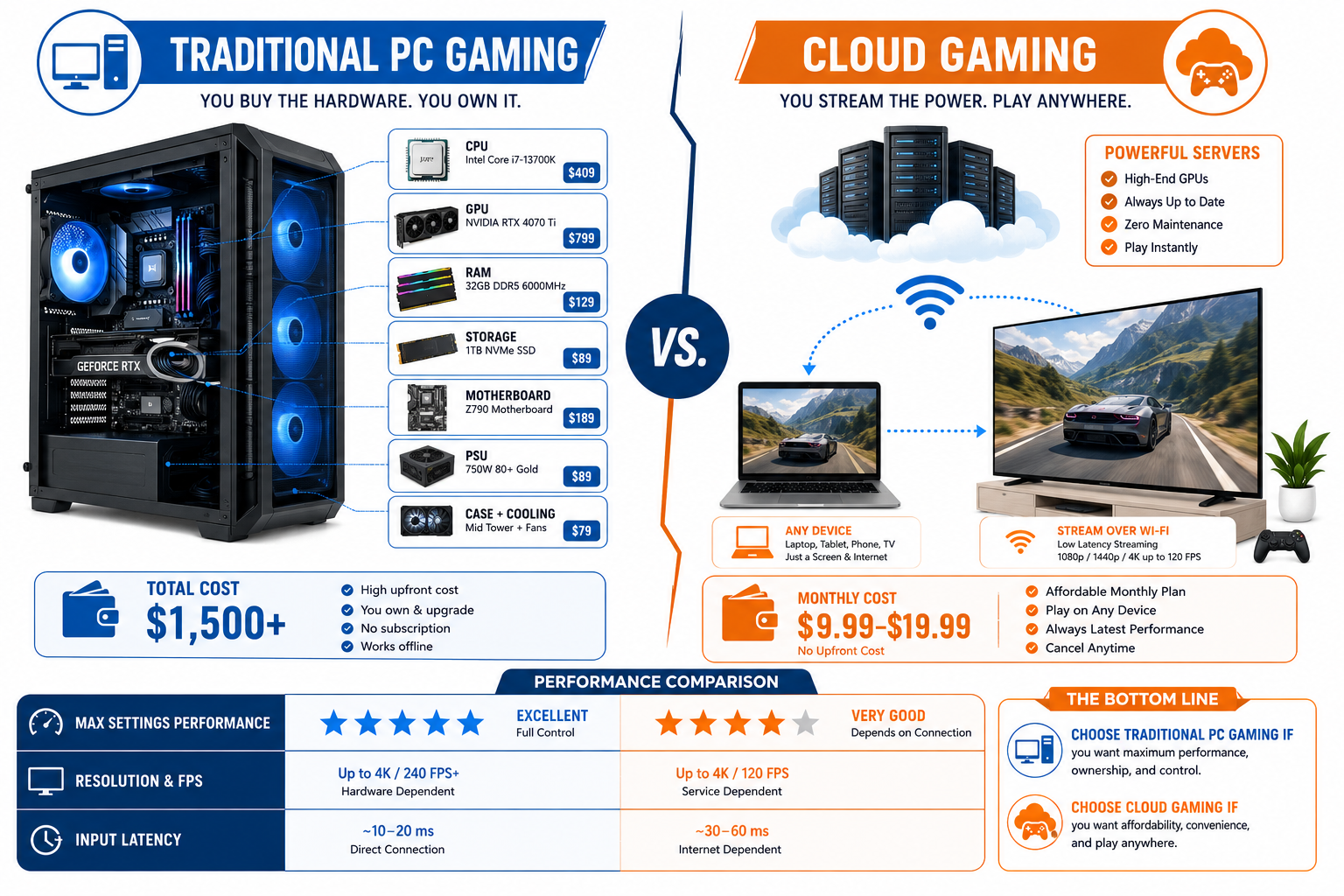
Cloud gaming trades hardware ownership for convenience and lower upfront cost. Traditional PC gaming gives you full control, no internet dependency, and typically better performance for competitive play — but at a much higher price.
| Factor | Cloud Gaming | Traditional PC Gaming |
|---|---|---|
| Upfront cost | $0–$20/month | $800–$2,500+ (hardware) |
| Hardware needed | Any screen + internet | Dedicated gaming PC/GPU |
| Game ownership | Mostly subscription/rental | Purchase or subscription |
| Performance ceiling | Limited by internet speed | Limited by hardware specs |
| Portability | Play anywhere with Wi-Fi | Tied to your machine |
| Input lag | 20–80ms (varies) | Near zero (local) |
| Game library | Hundreds to thousands | Virtually unlimited |
| Offline play | Not possible | Yes |
For a deeper look at how these platforms stack up against each other, see this breakdown of PlayStation vs Xbox vs PC gaming in 2026.
Choose cloud gaming if: you want to play casually, travel frequently, or can’t afford a gaming PC right now.
Choose traditional PC gaming if: you play competitively, need offline access, or want maximum performance and game ownership.
Is Cloud Gaming Cheaper Than Buying a Gaming PC?
For most people, yes — cloud gaming is significantly cheaper in the short term. A capable gaming PC in 2026 costs between $800 and $2,500 depending on the GPU and components. Cloud gaming subscriptions typically run $0 to $20 per month, meaning you could game for several years before matching the cost of a mid-range gaming PC build.
Cost breakdown (estimated, 2026):
- NVIDIA GeForce NOW (Free tier): $0/month, limited session length
- GeForce NOW Priority: ~$10/month
- Xbox Cloud Gaming (included with Game Pass Ultimate): ~$15/month
- PlayStation Plus Premium: ~$18/month
- Amazon Luna+: ~$10/month
The catch: most cloud services don’t include game purchases. You often need to own games separately (on Steam, for example) or rely on the platform’s included library. Over 3–5 years, costs can approach or exceed a mid-range PC build — especially if you subscribe to multiple services.
What Are the Top Cloud Gaming Platforms Right Now?
In 2026, the leading cloud gaming services are Xbox Cloud Gaming, NVIDIA GeForce NOW, PlayStation Plus Premium, and Amazon Luna. Each has different strengths depending on your existing ecosystem, game library preferences, and budget.
Top platforms compared:
- Xbox Cloud Gaming (xCloud): Best for Xbox and PC Game Pass subscribers. Huge library, strong mobile support, included in Game Pass Ultimate at ~$15/month.
- NVIDIA GeForce NOW: Best for PC gamers who already own games on Steam, Epic, or GOG. Streams your existing library. Free tier available; Priority and Ultimate tiers offer RTX graphics and longer sessions.
- PlayStation Plus Premium: Best for PlayStation fans. Includes PS4/PS5 titles and some PS3 classics via streaming. Requires a PS Plus subscription.
- Amazon Luna: Growing library, good Amazon Prime integration, works well on Fire TV devices. Less established than the top two.
- Boosteroid: A lesser-known but growing European-based service with competitive pricing and solid game support.
Common mistake: Signing up for a platform without checking if your favorite games are actually available. Always verify the game library before committing to a subscription.
What Kind of Internet Speed Do You Need for Cloud Gaming?
A minimum of 15 Mbps download speed is needed for 1080p gaming, while 35 Mbps or more is recommended for 4K streaming or low-latency competitive play. Latency (ping) matters just as much as raw speed — aim for under 40ms to a nearby server for a smooth experience.
Speed requirements by quality level:
| Quality | Minimum Speed | Recommended Speed | Latency Target |
|---|---|---|---|
| 720p / 30fps | 10 Mbps | 15 Mbps | <60ms |
| 1080p / 60fps | 15 Mbps | 25 Mbps | <40ms |
| 4K / 60fps | 35 Mbps | 50+ Mbps | <20ms |
Can your internet handle cloud gaming without lag? Run a speed test and check your ping to a server in your region. If your ping is consistently above 80ms, you’ll likely notice input delay — especially in action games. Wired Ethernet connections almost always outperform Wi-Fi for cloud gaming stability.
5G home internet and fiber connections have made cloud gaming far more viable in 2026 than it was just a few years ago.
Are There Any Free Cloud Gaming Services?
Yes, several platforms offer free tiers with real limitations. NVIDIA GeForce NOW has a free tier that lets you play for one-hour sessions with standard graphics before you’re queued out. Amazon Luna occasionally offers free trials. Xbox Cloud Gaming requires a Game Pass Ultimate subscription, so it’s not free, but Microsoft sometimes offers trial periods.
Free tier reality check:
- GeForce NOW Free: One-hour sessions, standard GPU, queue times during peak hours. Functional but frustrating for longer gaming sessions.
- Trial offers: Most paid services offer 1–3 month free trials for new subscribers. Worth using before committing.
- Browser-based options: Some platforms like Antstream Arcade offer free retro game streaming with ad support.
Free cloud gaming works best for casual players who game in short bursts. If you play for 2+ hours at a time, a paid tier is worth the cost.
What Games Are Available on Cloud Gaming Platforms?
Cloud gaming libraries vary widely by platform, but collectively cover thousands of titles across genres. Xbox Cloud Gaming includes hundreds of Game Pass titles, including major first-party releases like Halo, Forza, and third-party hits. GeForce NOW supports over 1,500 games from Steam, Epic, and other storefronts. PlayStation Plus Premium includes PlayStation exclusives and classic titles.
What’s typically available:
- AAA titles (many, but not all — publisher agreements vary)
- Indie games (strong selection on most platforms)
- Sports and racing games
- RPGs and open-world games
- Some older classics and remasters
What’s often missing:
- Day-one releases (some publishers delay cloud versions)
- Games with anti-cheat software that blocks cloud streaming
- Certain exclusives tied to specific platforms
For context on how indie titles are increasingly competing for space in these libraries, see how indie games are competing with AAA titles in 2026.
What Are the Biggest Drawbacks of Cloud Gaming?
The biggest drawbacks are input lag, internet dependency, and lack of true game ownership. These aren’t minor inconveniences — for some players, they’re dealbreakers.
Key limitations to know:
- Input lag: Even at 20ms, some players notice a slight delay. At 60–80ms, it becomes noticeable in fast games.
- No offline play: If your internet goes down, you can’t play. Period.
- Compression artifacts: Video streaming introduces visual quality loss, especially during fast motion.
- Game library gaps: Not every game is available, and publishers can pull titles from services.
- Data usage: 1080p cloud gaming uses roughly 10–15 GB per hour. Heavy players on capped data plans will hit limits fast.
- Subscription dependency: If a service shuts down (as Google Stadia did in 2023), your access disappears.
Is Cloud Gaming Good for Competitive Gamers?
For most competitive gaming, cloud gaming is not ideal in 2026. Competitive titles like Valorant, Counter-Strike 2, and fighting games require reaction times measured in single-digit milliseconds. Even a 20ms round-trip delay from cloud streaming adds up on top of monitor response time and network latency.
When cloud gaming works for competitive play:
- Turn-based or strategy games (latency is irrelevant)
- Slower-paced competitive games like MOBAs
- Casual ranked play where top-tier performance isn’t critical
When it doesn’t work:
- First-person shooters at high rank
- Fighting games where frame-perfect inputs matter
- Battle royale games where split-second decisions determine outcomes
If competitive gaming is your priority, a local gaming PC or console remains the better choice. For casual players who want to enjoy competitive games without chasing leaderboards, cloud gaming is perfectly adequate.
What Equipment Do You Need to Start Cloud Gaming?
The barrier to entry is genuinely low. To start cloud gaming, you need a screen (phone, tablet, laptop, smart TV, or PC), a stable internet connection, and a compatible controller or keyboard and mouse. That’s it.
Minimum setup checklist:
- A device with a screen (almost anything works)
- Internet connection (15+ Mbps recommended)
- A cloud gaming account/subscription
- A controller (Xbox, PlayStation, or third-party) or keyboard/mouse
- A cloud gaming app or supported browser (Chrome, Edge, Safari)
Optional upgrades that genuinely help:
- Wired Ethernet instead of Wi-Fi (reduces latency)
- A gaming monitor with low response time (reduces display lag)
- A 5 GHz Wi-Fi 6 router if wired isn’t possible
You don’t need a gaming PC, a dedicated GPU, or expensive peripherals. This accessibility is exactly how cloud gaming is changing the future of PC gaming — it removes the hardware gatekeeping that has kept many players out.
How Cloud Gaming Is Changing the Future of PC Gaming Long-Term
Cloud gaming is shifting PC gaming from a hardware-purchase model to a service model, similar to what happened with music (CDs to Spotify) and movies (DVDs to Netflix). The long-term implications are significant for players, developers, and hardware manufacturers alike.
Key shifts already underway in 2026:
- Lower hardware sales pressure: Players who use cloud gaming don’t need to upgrade GPUs every 2–3 years.
- Broader audience reach: Developers can target players on any device, not just those with capable PCs.
- Subscription economics: Publishers earn recurring revenue rather than one-time game sales.
- Geographic expansion: Players in regions where gaming PCs are unaffordable can access the same titles as players in wealthier markets.
This doesn’t mean traditional PC gaming is dying. Enthusiasts, competitive players, and creators will continue to invest in local hardware. But the center of gravity is shifting. The average gamer in 2026 has more options than ever before — and many of them don’t require opening a wallet for a $500 GPU.
If you’re managing a growing game library across platforms, these tips for managing your gaming backlog can help you stay organized regardless of where you play.
Final Thoughts
Cloud gaming is rapidly reshaping the future of PC gaming by removing many of the traditional hardware limitations that once defined the industry. With powerful remote servers handling demanding game processing, players can now enjoy high-end gaming experiences without investing in expensive gaming rigs. This shift is making gaming more accessible to a wider global audience while also changing how games are purchased, streamed, and played.
As internet infrastructure continues to improve and technologies like 5G, AI optimization, and low-latency streaming become more advanced, cloud gaming is expected to become even more reliable and mainstream. Major companies such as NVIDIA, Microsoft, and Sony are already investing heavily in this future, signaling a major transformation in the gaming landscape.
Frequently Asked Questions (FAQs): Cloud Gaming in 2026
Can I play cloud games on a Chromebook?
Yes. Most major cloud gaming services support Chromebooks through Chrome browser or dedicated apps. It’s one of the best use cases for Chromebook gaming.
Does cloud gaming work on a smart TV?
Yes, but it depends on the TV and service. Xbox Cloud Gaming works on Samsung smart TVs via a native app. Other services may require a streaming stick like Amazon Fire TV or Chromecast.
Is cloud gaming available in rural areas?
Only if you have a reliable broadband connection. Satellite internet (including Starlink) has improved significantly, but latency from geostationary satellites (500–600ms) makes cloud gaming impractical. Low-Earth orbit satellites like Starlink offer 20–60ms latency, which is borderline usable.
Can I use a keyboard and mouse for cloud gaming?
Yes. Most platforms support keyboard and mouse input, though some mobile-focused services are better optimized for controllers.
What happened to Google Stadia?
Google shut down Stadia in January 2023. Users received refunds for hardware and game purchases. It remains a cautionary example of platform risk in cloud gaming.
Is cloud gaming safe for kids?
Generally yes, with parental controls. Most platforms offer family accounts and content filters. For other kid-friendly online gaming options, see this guide to safe and fun online gaming for kids.