
Minecraft Bedrock Edition is no longer just the “simple” version of Minecraft. In 2026, Bedrock players can use many powerful add-ons to change gameplay, improve graphics, add new mobs, unlock weapons, explore new biomes, and make survival or creative mode more exciting.
But Bedrock mods work differently from Java mods. Here, mods are usually called add-ons, and they come as behavior packs, resource packs, or Marketplace downloads. Some are free, some are paid, and not every add-on works smoothly on every device.
That is why this guide is useful. Here, you will find the best Minecraft Bedrock mods for 2026, how they work, which ones are safe to download, how to install them, and which add-ons are best for survival, creative, beginners, graphics, and multiplayer gameplay.
What Are the Top Minecraft Mods for Bedrock in 2026?
The best Minecraft mods for 2026 Bedrock span combat, exploration, graphics, and survival gameplay. Here are the standout picks right now:
Halo Addon
Released on May 22, 2026, this is one of the most talked-about add-ons of the year. It drops Covenant enemies, Spartan armor sets, and iconic Halo weapons directly into your Bedrock world. If you want a survival experience that feels like a crossover event, this one delivers. It’s free to download from community sources and works on most current Bedrock versions.
Aether Legends
The legendary Aether mod — a Java classic since 2011 — is finally coming to Bedrock on July 14, 2026 as an official Marketplace add-on. It adds a sky dimension packed with floating islands, new mobs, and unique gear. This one will cost Minecoins, but the quality matches the price. It’s a must-have for players who want a major new dimension to explore.
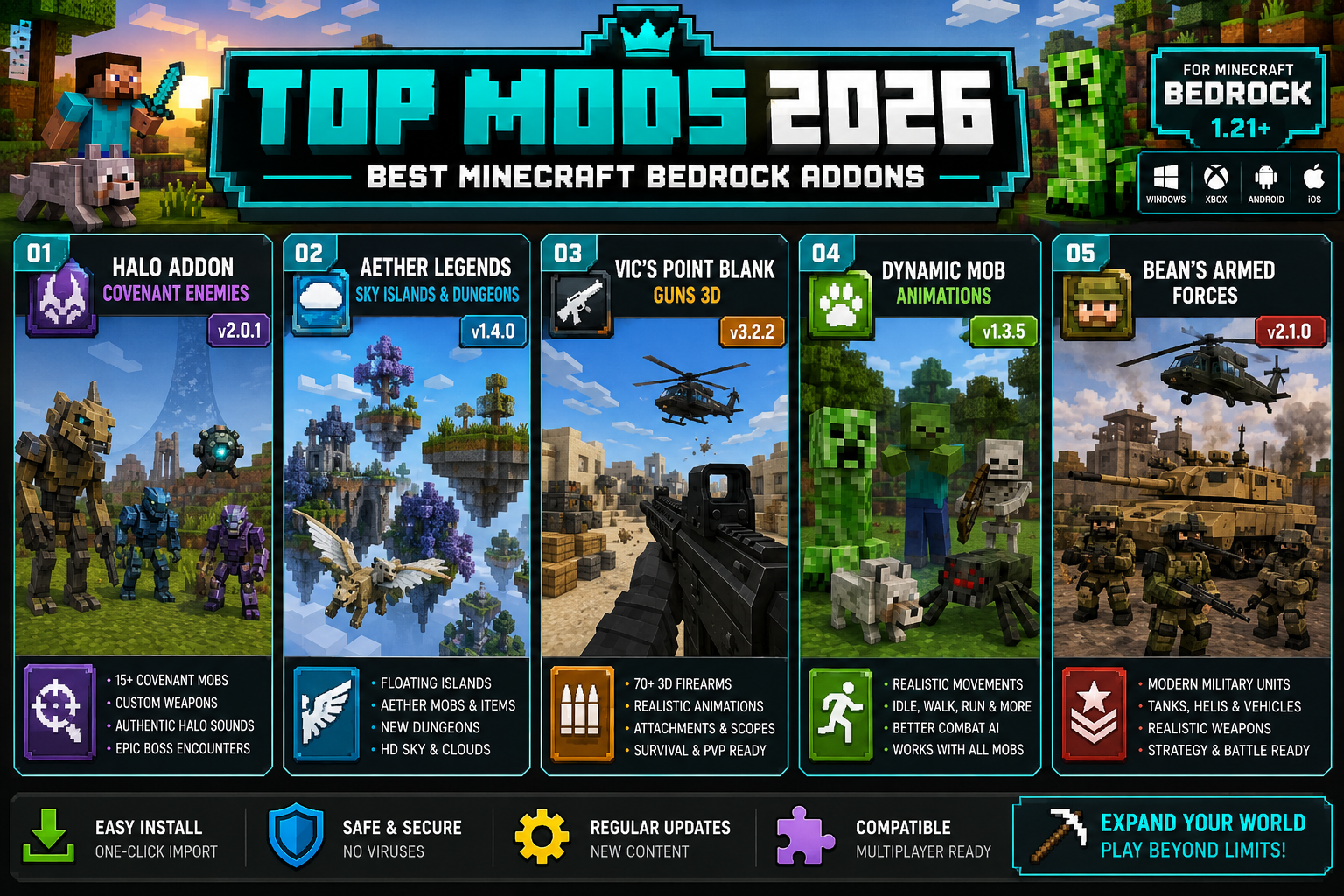
Vic’s Point Blank Guns Addon
Available since April 30, 2026, this addon adds 3D firearms — including the AK12 and Desert Eagle — with high-quality textures and realistic sound effects. Combat in survival mode feels completely different with this installed. It’s popular with players who find vanilla combat too simple.
Bean’s Armed Forces Addon
Launched May 11, 2026, this military-themed pack brings modern weapons and tactical gameplay to Bedrock. It’s built for players who want structured, action-heavy survival sessions. The attention to detail on the weapon models is noticeably good.
Dynamic Mob Animations Resource Pack
Released in April 2026, this pack doesn’t add new content — it makes existing mobs move better. Creepers, zombies, and other creatures get smoother, more lifelike animations. It’s a low-effort install with a noticeable visual payoff.
Other solid picks for 2026:
- Anime-themed add-on bundles (over 250 modes from the March 2026 Bedrock 26.3 showcase)
- Biome expansion packs from the Marketplace
- Furniture and decoration add-ons for builders
How Do Minecraft Mods Work on Bedrock Edition?
Bedrock doesn’t use mods the same way Java does. Instead, Bedrock uses a system called add-ons, which are split into two types: behavior packs (change how the game works) and resource packs (change how the game looks). You apply them per world, not globally.
- Behavior packs can add new mobs, change AI, or introduce new items.
- Resource packs swap out textures, sounds, and animations.
- Some add-ons combine both for a complete experience.
Unlike Java mods that require Forge or Fabric, Bedrock add-ons install directly through the game’s settings menu. No third-party launcher needed. This is why Bedrock is more accessible for younger players and console users. If you’re new to Minecraft entirely, check out this guide on how to create a free Minecraft account before diving into add-ons.
Are Minecraft Bedrock Mods Free or Do They Cost Money?
Some are free, some aren’t. Here’s the breakdown:
| Type | Cost | Where to Get It |
|---|---|---|
| Community add-ons | Free | MCPEDL, mcpedude.com, Planet Minecraft |
| Marketplace packs | 160–1,340 Minecoins | In-game Minecraft Marketplace |
| Realms Plus bundles | Included with subscription | Realms Plus (enhanced in April 2026) |
| Creator Fund add-ons | Varies | Marketplace (new 2026 wave) |
Most of the combat and mob add-ons mentioned above — like the Halo Addon and Vic’s Guns — are free from community sites. Aether Legends, being an official Marketplace release, will require Minecoins. Realms Plus subscribers now get better Marketplace access, including exclusive packs and early releases, as of April 2026.
Which Minecraft Mods Are Compatible With My Device?
Most Bedrock add-ons work across all platforms — Windows, Xbox, PlayStation, Nintendo Switch, iOS, and Android — as long as you’re running a supported Bedrock version. The key version to know right now is 1.21.60, which brought new enchantments and crafting mechanics. The March 2026 “Tiny Takeover” update (version 26.10) also added new blocks and features that some newer add-ons depend on.
Quick compatibility checklist:
- Check the add-on’s listed minimum version before downloading.
- Console players (Xbox, PlayStation) can only use Marketplace add-ons or sideload via workarounds — direct file installs aren’t always straightforward.
- Mobile players on iOS and Android have the most flexibility for community add-ons.
- PC (Windows 10/11) supports both Marketplace and manual .mcpack installs.
If you’re choosing between platforms, this PlayStation vs Xbox vs PC gaming comparison breaks down which setup gives you the most flexibility for modding.
How Do I Install Minecraft Mods on Bedrock Edition?
Installing add-ons on Bedrock is straightforward once you know the steps.
For .mcpack or .mcaddon files (PC and mobile):
- Download the file from a trusted source.
- Double-click the file — it opens directly in Minecraft.
- Go to Settings > Storage to confirm it imported.
- Create or open a world, then go to Add-Ons in world settings.
- Apply the behavior pack and/or resource pack.
- Save and launch the world.
For Marketplace add-ons:
- Open Minecraft and go to the Marketplace.
- Purchase or download the add-on.
- Apply it in world settings the same way.
Common mistake: Applying a behavior pack without the matching resource pack (or vice versa) for add-ons that need both. Always read the add-on’s install notes.
Minecraft Mods for Survival vs Creative Gameplay
The right add-on depends on how you play. Survival and creative modes benefit from very different types of packs.
Best for survival:
- Halo Addon — new enemies and weapons add real challenge
- Bean’s Armed Forces — tactical combat changes survival pacing
- Vic’s Point Blank Guns — upgrades combat depth significantly
- Aether Legends — a full new dimension to survive through
Best for creative:
- Furniture and decoration packs — expand building options
- Biome and terrain add-ons — give builders new environments
- Dynamic Mob Animations — makes showcase builds look better
If you enjoy farming and base-building survival loops, you might also like exploring offline farming games as a break from Minecraft’s grind.
Best Minecraft Mods for Beginners in 2026
New players should avoid complex add-ons that overhaul core mechanics. Start simple.
Beginner-friendly picks:
- Dynamic Mob Animations — no gameplay changes, just better visuals
- Simple texture packs from the Marketplace — low risk, easy to remove
- Furniture add-ons — add decoration without breaking survival balance
- Biome packs — expand world generation without changing game rules
Avoid combat overhaul mods like Vic’s Guns or Bean’s Armed Forces until you’re comfortable with vanilla survival. Those add-ons change core mechanics in ways that can be confusing early on. Also worth reading: Minecraft seeds to explore new adventures — a great way to get more variety without any add-ons at all.
Minecraft Mods That Improve Graphics and Performance
The Dynamic Mob Animations Resource Pack (April 2026) is the headline graphics upgrade for Bedrock this year. It improves mob movement without requiring a high-end device. For more dramatic visual changes, shader packs from the Marketplace offer better lighting and shadow effects.
Things to know about performance:
- Resource packs affect frame rate — heavier packs need more RAM.
- On mobile, stick to lightweight packs (under 50MB) to avoid lag.
- Xbox Series X and PS5 handle most packs without issues.
- Older devices (iPad Air 2, Xbox One) may struggle with shader-heavy packs.
The February 2026 hotfix (version 26.2) specifically addressed add-on crashes and missing textures, so keeping your game updated is the best way to avoid graphical glitches.
Are Minecraft Bedrock Mods Safe to Download?
Marketplace add-ons are safe — they’re reviewed by Mojang before listing. Community add-ons carry more risk if you download from random sites.
Safe download sources:
- Minecraft Marketplace (in-game)
- MCPEDL.com
- mcpedude.com
- Planet Minecraft (Bedrock section)
Red flags to avoid:
- Sites asking you to complete surveys before downloading
- .exe files disguised as .mcpack files
- Add-ons requiring you to disable antivirus software
- Unofficial APK versions of Minecraft bundled with “mods” — see Jojoy Minecraft for context on what these are and how they work
Stick to known community platforms and you’ll be fine. The Minecraft community is generally good at flagging bad actors quickly.
Minecraft Mods for Multiplayer and Server Gameplay
Multiplayer add-ons work best through Realms Plus, which as of April 2026 gives subscribers access to exclusive Marketplace packs and early releases. For server play, all players in a session need the same add-ons applied — this is the most common source of multiplayer issues.
Tips for multiplayer add-on sessions:
- Share the exact same .mcpack file version with all players.
- Use Realms to host — it handles pack syncing automatically.
- Avoid behavior packs that change core item IDs, as these cause inventory bugs in multiplayer.
- Combat add-ons like Bean’s Armed Forces are great for PvP sessions with friends.
If you’re streaming your modded Minecraft sessions, check out the best software for gamers to live-stream games to set up a clean broadcast.
Common Mistakes When Installing Minecraft Bedrock Mods
Even experienced players run into these. Here’s what to watch for:
- Not updating Minecraft first — Many 2026 add-ons require version 1.21.60 or the 26.10 update. Running an older version causes instant crashes.
- Mixing incompatible packs — Two behavior packs that both modify mob AI will conflict. Test packs one at a time.
- Applying packs to existing worlds — Some add-ons only generate new content in freshly created worlds. Adding them mid-playthrough won’t spawn new biomes or mobs in already-explored chunks.
- Forgetting to apply both pack types — If an add-on includes both a behavior and resource pack, you need both active.
- Ignoring version tags — A pack labeled “1.20 compatible” may not work correctly on 1.21.60.
Minecraft Mods That Add New Biomes and Creatures
Biome and creature add-ons are among the most popular categories on Bedrock. The Aether Legends add-on (launching July 14, 2026) is the biggest upcoming release in this category — it adds an entire sky dimension with new biomes, creatures, and loot. For creature-focused packs, the anime-themed bundles showcased in March 2026 included over 250 transformation modes and new enemy types inspired by popular series.
What to look for in a good biome add-on:
- Does it generate new terrain in new chunks, or does it overwrite existing biomes?
- Does it include matching mobs, or just terrain?
- Is it compatible with other installed behavior packs?
The best biome packs are self-contained — they add new areas without breaking vanilla generation in explored chunks. Pair these with fresh Minecraft seeds for the best results on a new world.
Final Thoughts
The best Minecraft mods for 2026 Bedrock cover a wide range — from full combat overhauls like the Halo Addon to visual upgrades like Dynamic Mob Animations. The platform has never had more quality add-ons available, and with Mojang’s 2026 Creators Fund pushing more developers into the space, that list is only growing.
Start with one or two add-ons that match your playstyle. Test them on a fresh world. Keep your game updated. And download only from trusted sources.
Whether you’re a survival grinder, a creative builder, or a multiplayer PvP fan, there’s something in the 2026 Bedrock add-on library worth trying right now.
Frequently Asked Questions
Q: Can I use Java mods on Minecraft Bedrock?
No. Java mods (.jar files) are not compatible with Bedrock. Bedrock uses its own add-on format (.mcpack or .mcaddon). Some popular Java mods, like Aether, are being officially ported to Bedrock, but you need the Bedrock-specific version.
Q: Do Minecraft Bedrock add-ons disable achievements?
Yes. Applying behavior packs to a world disables achievements for that world permanently. Resource packs alone don’t affect achievements. If achievements matter to you, keep a separate vanilla world.
Q: How many add-ons can I run at once on Bedrock?
There’s no hard limit, but running too many behavior packs at once causes conflicts and performance drops. Most experienced players recommend no more than 3-5 behavior packs active simultaneously.
Q: Will Bedrock add-ons from 2024 still work in 2026?
Many will, but not all. Add-ons that haven’t been updated for the 1.21.60 or 26.10 builds may have broken textures or missing features. Always check the add-on’s last update date before installing.
Q: Is the Aether Legends add-on a free download?
No. Aether Legends is an official Minecraft Marketplace release launching July 14, 2026, and will require Minecoins to purchase. It’s not available as a free community download.
Q: Can I install Bedrock add-ons on Nintendo Switch?
Switch players can only use add-ons purchased through the Minecraft Marketplace. Manual file installs (.mcpack) are not supported on Switch due to platform restrictions.
Q: What’s the difference between a resource pack and a behavior pack?
A resource pack changes visuals — textures, sounds, animations. A behavior pack changes gameplay — mob AI, item functions, crafting recipes. Many add-ons bundle both together in a single .mcaddon file.
Q: Do Bedrock add-ons work on the PS5 version of Minecraft?
Yes. PS5 runs Bedrock Edition, so Marketplace add-ons work normally. Manual file installs are not supported on PlayStation, so you’re limited to Marketplace content on that platform.
Q: Are there add-ons that improve Minecraft Bedrock’s performance rather than add content?
Yes. Lightweight optimization resource packs reduce texture resolution and simplify rendering to improve frame rates on older devices. Search for “performance pack” or “FPS booster” on MCPEDL for current options.
Q: How does the 2026 Creators Fund affect add-on quality?
Mojang’s 2026 Creators Fund gives developers financial support and Marketplace access, which encourages higher-quality, better-maintained add-ons. Expect more polished releases through the second half of 2026 as funded creators publish their work.