
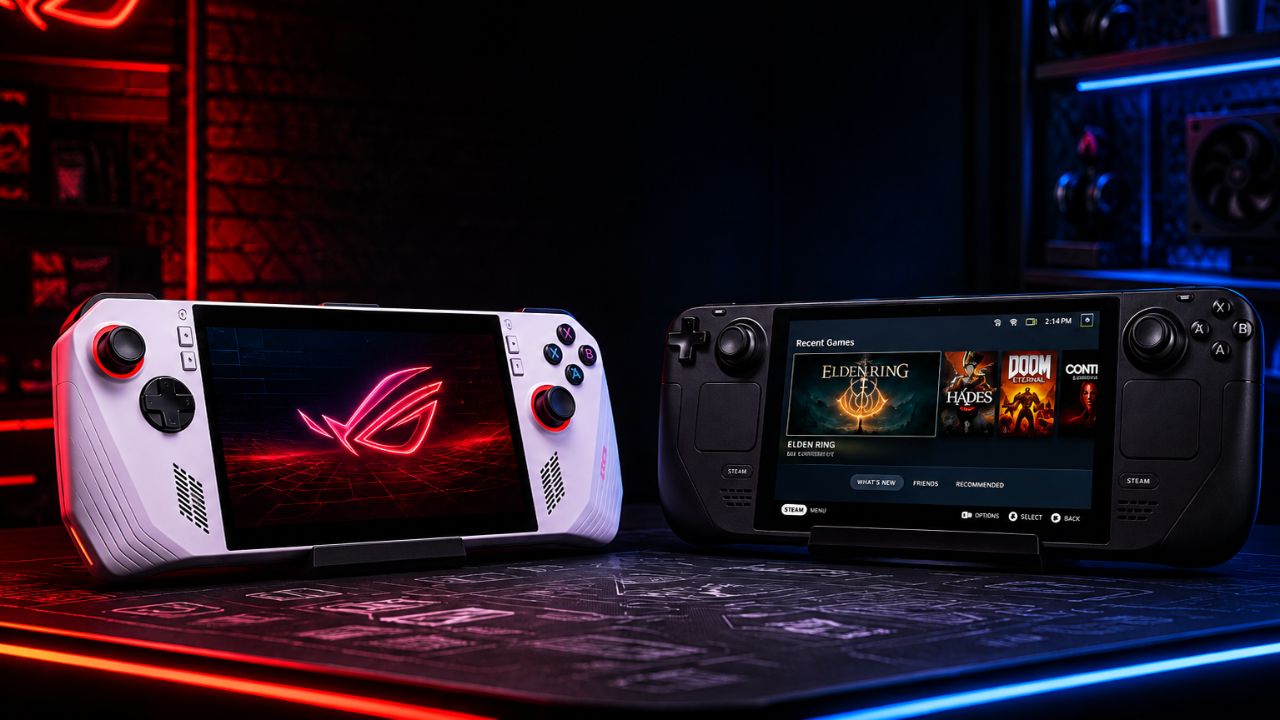
The battle for the best PC gaming handheld is more competitive than ever in 2026. With the ASUS ROG Ally continuing to evolve through software updates and Windows optimization, and the Steam Deck remaining a favorite thanks to its seamless SteamOS experience and excellent value, choosing between these two devices is no longer a simple matter of comparing specifications. Each handheld excels in different areas, whether it’s raw gaming performance, battery life, display quality, game compatibility, portability, or overall user experience.
In this latest comparison, we’ll break down every major difference between the ASUS ROG Ally and the Steam Deck, including performance benchmarks, display technology, battery endurance, operating systems, game library support, pricing, and long-term value. Whether you’re planning to play the latest AAA titles, stream games through Xbox Game Pass, or enjoy indie favorites on the go, this guide will help you determine which handheld gaming PC is the better investment for your needs in 2026.
What Is the Difference Between the ASUS ROG Ally and Steam Deck in 2026?
The ASUS ROG Ally is a Windows-based handheld gaming PC built around AMD’s Ryzen Z1 Extreme APU, while the Steam Deck OLED runs Valve’s SteamOS (a Linux-based operating system) with a custom AMD RDNA 2 APU. These two devices represent different philosophies: ASUS targets performance-first PC gamers, while Valve targets accessibility and value.
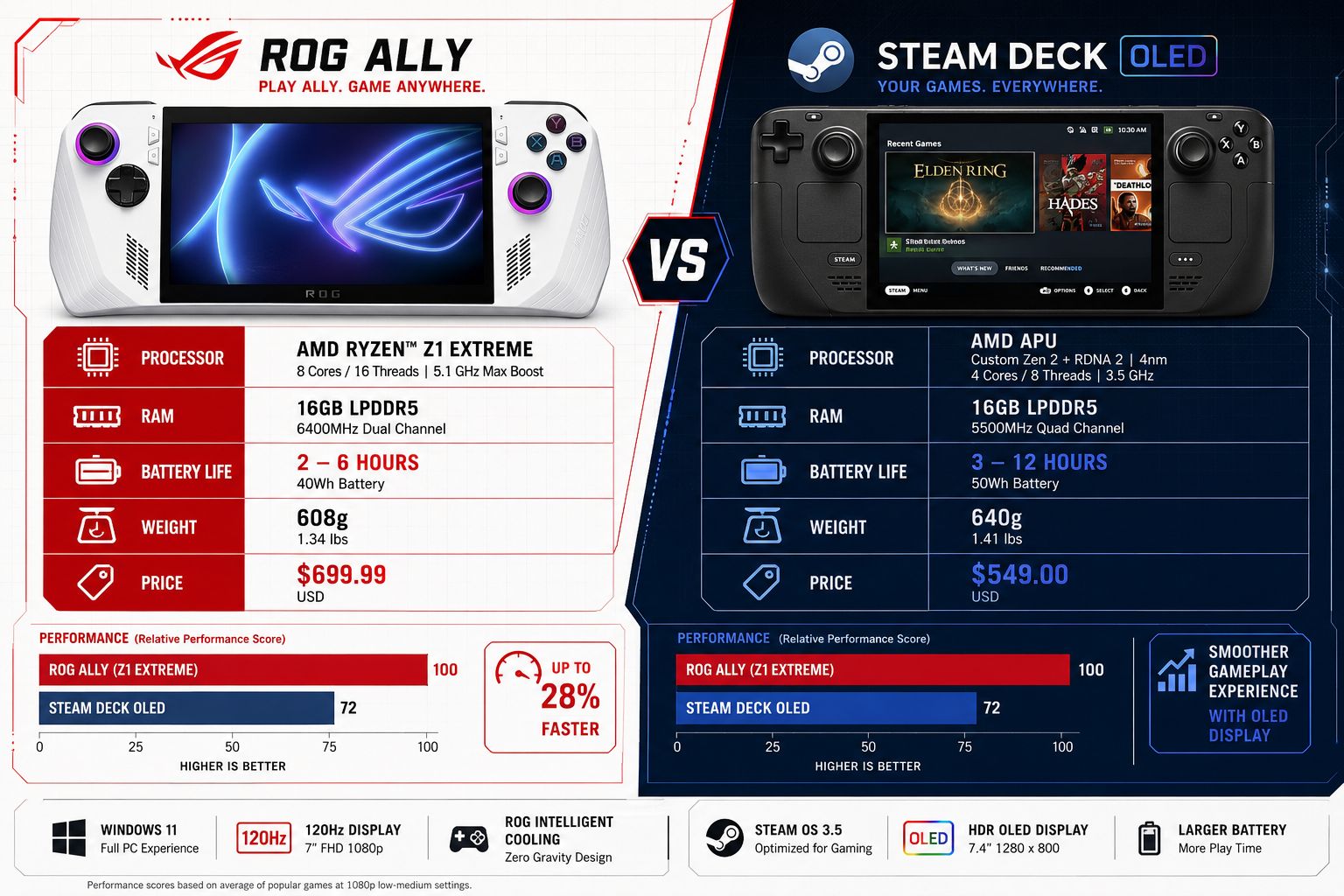
Key differences at a glance:
| Feature | ASUS ROG Ally X | Steam Deck OLED |
|---|---|---|
| OS | Windows 11 | SteamOS 3 (Linux) |
| CPU/GPU | AMD Ryzen Z1 Extreme | AMD RDNA 2 Custom APU |
| RAM | 24 GB LPDDR5 | 16 GB LPDDR5 |
| Display | 7″ 1080p 120Hz IPS | 7.4″ 800p OLED 90Hz |
| Storage | 1 TB NVMe SSD | 512 GB NVMe SSD |
| Battery | 80 Wh | 50 Wh |
| Weight | 678 g | 640 g |
| Starting Price (2026) | ~$799 | ~$549 |
The ROG Ally X wins on specs. The Steam Deck OLED wins on display quality (OLED panel with better contrast and color depth), price, and battery efficiency.
ASUS ROG Ally vs Steam Deck Latest Comparison: Performance and Gaming
The ROG Ally outperforms the Steam Deck in raw frame rates for demanding titles, particularly at 1080p. In titles like Cyberpunk 2077, Elden Ring, and other GPU-heavy games, the Ryzen Z1 Extreme consistently delivers higher average frame rates than the Steam Deck’s older RDNA 2 chip, according to multiple hardware review outlets including Digital Foundry and IGN Hardware (2025).
For most indie games, visual novels, or older AAA titles, the performance gap shrinks considerably. Both devices handle games like Hades II, Hollow Knight, and Stardew Valley without any noticeable difference.
Choose the ROG Ally if:
- You want to play the latest AAA releases at higher settings.
- You need to run non-Steam launchers (Epic, Xbox Game Pass, Battle.net).
- Frame rate consistency matters more than battery life.
Choose the Steam Deck if:
- Your library is mostly on Steam.
- You prefer a plug-and-play experience with minimal setup.
- You want better value for the money spent.
For players interested in demanding open-world games, check out this complete walkthrough for Elden Ring Shadow of the Erdtree DLC to understand what kind of performance demands modern titles place on handheld hardware.
Which Handheld Gaming Device Is Better for Emulation?
The ASUS ROG Ally is the stronger emulation machine, particularly for newer console generations. Its Ryzen Z1 Extreme chip handles PS3 (RPCS3), Nintendo Switch (Yuzu/Ryujinx), and even some PS4 titles more smoothly than the Steam Deck’s older APU.
The Steam Deck handles emulation up to PS2, GameCube/Wii, and PSP very well. EmuDeck, a popular emulation setup tool, works on both devices, but the ROG Ally benefits from Windows compatibility, which gives it access to more emulators and configurations without workarounds.
Edge case: If you plan to emulate Switch games specifically, the ROG Ally’s extra RAM (24 GB vs 16 GB) and faster chip make a meaningful difference in titles like Xenoblade Chronicles 3 or Tears of the Kingdom.
ASUS ROG Ally vs Steam Deck Battery Life Comparison
Battery life is one of the Steam Deck OLED’s biggest advantages. In typical gaming sessions, the Steam Deck OLED delivers roughly 4-6 hours depending on the title, while the ROG Ally X manages around 2-4 hours under similar conditions, based on hands-on testing reported by The Verge and Tom’s Hardware (2025).
The reason comes down to two factors:
- SteamOS is more power-efficient than Windows 11 for gaming workloads.
- The OLED panel in the Steam Deck draws less power than the ROG Ally’s IPS LCD at comparable brightness.
The ROG Ally X improved battery capacity to 80 Wh (up from 40 Wh in the original model), which helps — but Windows’ background processes still drain power faster than SteamOS does.
Practical tip: If you plan to game on long flights or without access to a charger for several hours, the Steam Deck OLED is the more reliable choice. The ROG Ally is better suited for shorter sessions or use near a power outlet.
Can You Play Windows Games on Steam Deck?
The Steam Deck cannot run native Windows games directly, but it uses a compatibility layer called Proton (built on Wine) to run many Windows titles through Steam. Valve’s “Verified” and “Playable” ratings indicate which games work well through Proton. As of mid-2026, over 15,000 Steam titles are rated Verified or Playable (source: ProtonDB community database, 2026).
However, games that require kernel-level anti-cheat software (like some versions of Valorant or certain Call of Duty modes) do not work on SteamOS. Non-Steam launchers also require manual setup and often don’t work reliably.
The ROG Ally, running Windows 11, plays any Windows game natively with no compatibility layer needed. This is a significant advantage for players with mixed libraries across Epic, Xbox Game Pass, or Battle.net.
For players who want to stay updated on competitive titles that may have anti-cheat restrictions, the Valorant Episode Patch Notes Explained 2026 page covers current compatibility and update details.
ROG Ally Price vs Steam Deck: How Much Do They Cost in 2026?
As of mid-2026, the Steam Deck OLED starts at approximately $549 for the 512 GB model. The ASUS ROG Ally X starts at approximately $799 for the 1 TB model. That is a $250 difference, which is significant for most buyers.
Cost breakdown:
- Steam Deck OLED 512 GB: ~$549
- ASUS ROG Ally X 1 TB: ~$799
- ASUS ROG Ally (base model, Z1 non-Extreme): ~$599 (still available at some retailers)
- Accessories (dock, case, extra charger): $30-$100 for either device
The base ROG Ally (non-X, with the Z1 chip rather than Z1 Extreme) sits closer to the Steam Deck’s price range but loses most of the performance advantages that justify buying it over the Steam Deck. At similar price points, the Steam Deck OLED is the better value.
Steam Deck OLED vs ASUS ROG Ally: Which Should You Buy?
This is the core question in any ASUS ROG Ally vs Steam Deck latest comparison, and the answer depends on your priorities.
Buy the Steam Deck OLED if:
- Your game library is primarily on Steam.
- You want longer battery life and a better display for the price.
- You prefer a console-like experience with minimal tinkering.
- Budget is a key concern.
- You play mostly indie games, RPGs, or older AAA titles.
Buy the ASUS ROG Ally X if:
- You need access to all Windows launchers and Game Pass.
- You want to play the latest AAA titles at higher performance settings.
- You plan to use it docked as a desktop replacement.
- You want more RAM for emulation or multitasking.
- You’re comfortable troubleshooting Windows issues occasionally.
For players who enjoy deep RPGs on handheld, resources like the Best BG3 Builds for Every Class in 2026 guide work well on both devices, though Baldur’s Gate 3 runs more smoothly on the ROG Ally at higher settings.
ASUS ROG Ally Overheating Problems and Fixes
The original ASUS ROG Ally had a well-documented microSD card slot overheating issue that could damage cards during extended play. ASUS addressed this partially through firmware updates, and the ROG Ally X redesigned the thermal system with improved heat pipe routing and a larger fan.
Common overheating complaints and fixes:
- High ambient temperatures: Use the ROG Ally in Performance mode only when plugged in. Switch to Silent or Balanced mode for handheld play.
- MicroSD card damage (original model): Avoid storing games on microSD during intensive sessions; use the internal SSD instead.
- Fan noise at max load: This is normal. The ROG Ally’s fans are loud under heavy load — use headphones.
- Thermal throttling in long sessions: Apply a custom TDP limit (around 15W) through the Armoury Crate software to balance heat and performance.
The ROG Ally X is meaningfully better than the original in thermal management, but it still runs warmer than the Steam Deck under equivalent loads.
ASUS ROG Ally Stuck on Windows: What to Do
The ROG Ally occasionally gets stuck during Windows updates, fails to boot properly, or freezes on the ASUS logo screen. These are known issues with running a full desktop OS on handheld hardware.
Step-by-step fixes:
- Force restart: Hold the power button for 10-15 seconds to force shutdown, then restart.
- Boot into recovery: Hold Volume Down + Power to access the BIOS/recovery menu.
- Use the ASUS Cloud Recovery tool: This reinstalls Windows without needing a USB drive, accessible from the BIOS menu.
- Create a Windows recovery USB: Download the ROG Ally recovery image from ASUS’s support site and flash it to a USB drive as a backup.
- Disable automatic Windows updates: Use the Windows Update settings or a third-party tool to schedule updates for when the device is docked and plugged in.
Most Windows-related issues on the ROG Ally are solvable, but they require more technical comfort than the Steam Deck’s SteamOS, which updates seamlessly in the background.
Steam Deck or ROG Ally: Which Is Better for Indie Games?
For indie games, the Steam Deck OLED is the better device. The Steam library has the deepest catalog of indie titles, and Valve’s Verified program ensures that most indie games work perfectly out of the box on SteamOS. The OLED display also makes games with strong art direction — like Hollow Knight, Celeste, or Disco Elysium — look noticeably better than on the ROG Ally’s IPS panel.
The indie gaming scene continues to grow rapidly in 2026. For a look at how smaller studios are holding their own against major publishers, see How Indie Games Are Competing With AAA Titles in 2026.
The ROG Ally is not bad for indie games — it runs them fine — but the Steam Deck’s lower price, better display, and curated library make it the natural home for indie gaming on a handheld.
Can the Steam Deck Run Triple-A Games Like the ROG Ally?
Yes, the Steam Deck can run many AAA titles, but not always at the same settings or frame rates as the ROG Ally. Games like Cyberpunk 2077, Red Dead Redemption 2, and Elden Ring run on the Steam Deck, typically at 30-40 fps with medium-to-low settings at 800p. The ROG Ally runs the same titles at 45-60 fps with higher settings at 1080p.
For players who want a consistent 60 fps experience in demanding AAA games, the ROG Ally is the more capable device. For players who are comfortable with 30 fps and prefer to spend less, the Steam Deck handles most AAA titles adequately.
Titles like Cyberpunk 2077’s best side quests are fully playable on both devices, though the ROG Ally delivers a smoother experience in Night City’s dense environments.
ASUS ROG Ally vs Steam Deck Latest Comparison: Game Library Support
The Steam Deck has a broader verified game library through Valve’s compatibility program, with over 15,000 rated titles as of 2026. The ROG Ally, running Windows 11, technically has access to every PC game ever made — but “access” and “optimized experience” are different things.
Many PC games are not optimized for handheld controls or small screens. On the Steam Deck, Valve’s curation means most games in the Verified category just work with controller support, proper UI scaling, and stable performance. On the ROG Ally, players sometimes need to manually configure controller bindings, adjust resolution, or troubleshoot launcher issues.
Game Pass advantage: The ROG Ally is the clear winner for Xbox Game Pass subscribers. Game Pass is not available on Steam Deck without significant workarounds, and even then it’s unreliable. If Game Pass is part of your gaming budget, the ROG Ally makes much more financial sense.
For players tracking the most anticipated upcoming releases, the Most Anticipated Games of June 2026 guide covers titles launching on both platforms.
Who Is the ASUS ROG Ally Best For vs the Steam Deck?
The ROG Ally is best for power users, Windows gamers, and Game Pass subscribers who want the most performance from a handheld device and don’t mind occasional software troubleshooting. It suits players who game in short bursts near a charger and want to play the newest releases at the best possible settings.
The Steam Deck is best for Steam-heavy gamers, budget-focused buyers, indie game fans, and anyone who wants a device that works like a console — turn it on and play. It also suits travelers and commuters who need longer battery life.
Neither device is ideal for:
- Players who primarily play console exclusives (PS5, Nintendo Switch games).
- Anyone who wants a truly pocket-sized device (both are large by phone standards).
- Buyers who need cellular connectivity.
For a broader look at how handheld gaming fits into the larger platform landscape, the PlayStation vs Xbox vs PC: Best Gaming Platform in 2026 comparison provides helpful context.
Common Mistakes People Make Choosing Between ROG Ally and Steam Deck
Many buyers regret their choice because they didn’t account for how they actually play, not how they imagine they’ll play.
Mistake 1: Buying the ROG Ally for Game Pass, then not using it.
Game Pass is a great reason to choose the ROG Ally, but if you already have 200+ Steam games, you’ll likely default to those anyway.
Mistake 2: Assuming the ROG Ally “just works” like a console.
It runs Windows 11. Updates interrupt sessions, drivers need maintenance, and some games require launcher sign-ins. Budget time for setup.
Mistake 3: Underestimating the Steam Deck’s display advantage.
The OLED panel is a genuine quality-of-life improvement for long sessions. Many buyers who chose the ROG Ally for performance later wished they had the Steam Deck’s screen for casual play.
Mistake 4: Ignoring the used market.
Both devices hold their value well, but refurbished or used Steam Decks from Valve’s own store often represent excellent value at $399-$449.
Mistake 5: Not checking Proton compatibility before buying the Steam Deck.
If your most-played game uses kernel-level anti-cheat, verify it works on SteamOS at ProtonDB.com before committing.
ASUS ROG Ally Alternatives If You Don’t Want the Steam Deck
If neither the ROG Ally nor the Steam Deck fits your needs, several strong alternatives exist in 2026.
- Lenovo Legion Go: Larger 8.8″ display, detachable controllers, AMD Z1 Extreme chip. Better for players who want a bigger screen and more controller flexibility. Priced around $699.
- MSI Claw A2: Intel Lunar Lake-based APU, Windows 11, competitive performance with improved battery life over the original Claw. Around $749.
- AYANEO 3: Premium build quality, multiple APU options, higher price point (~$899+). Best for enthusiasts who want the most customization.
- GPD Win 4 (2025 edition): Smaller form factor with a slide-out keyboard. Good for players who want a more portable device with text input.
For players interested in how the broader gaming hardware market is evolving, the Gaming Industry Predictions: What Changes Before 2030? article covers where handheld gaming is headed.
Final Thoughts
The ASUS ROG Ally vs Steam Deck latest comparison in 2026 comes down to a clear trade-off: performance and flexibility versus value and simplicity. Neither device is objectively superior for every buyer.
Actionable next steps:
- Check your game library first. If 80% of your games are on Steam, the Steam Deck OLED is almost certainly the right choice.
- Assess your use case. Game Pass subscriber? ROG Ally. Traveling gamer who needs battery life? Steam Deck.
- Set a firm budget. At $549, the Steam Deck OLED is hard to beat. If you can spend $799 and want the performance jump, the ROG Ally X delivers it.
- Check ProtonDB before buying the Steam Deck if you have specific titles in mind that may not be Linux-compatible.
- Consider the used market. Valve sells certified refurbished Steam Decks directly, often at meaningful discounts.
Both devices represent the best the handheld gaming market has to offer in 2026. The right one is the one that fits how you actually play — not just how you plan to.
Frequently Asked Questions (FAQs)
Is the ASUS ROG Ally worth it in 2026?
Yes, if you need Windows compatibility, Game Pass access, or the best handheld performance for AAA games. If those aren’t priorities, the Steam Deck OLED offers better value.
Which has a better display, ROG Ally or Steam Deck?
The Steam Deck OLED has a better display for most users. Its OLED panel delivers deeper blacks, better contrast, and more vivid colors than the ROG Ally’s IPS LCD, despite having a lower resolution (800p vs 1080p).
Does the Steam Deck work with Xbox Game Pass?
Not reliably. Xbox Game Pass requires Windows or an Xbox console. Getting it to work on SteamOS requires workarounds that are unstable. The ROG Ally is the correct choice for Game Pass users.
Can I install SteamOS on the ASUS ROG Ally?
Valve released a SteamOS installer compatible with some third-party handhelds, including the ROG Ally, in late 2024. It works but is not officially supported by ASUS, and some features (like the Armoury Crate software) do not function under SteamOS.
Which device is better for travel?
The Steam Deck OLED is better for travel due to longer battery life and a more stable OS that doesn’t require updates mid-session. The ROG Ally is better for hotel room gaming near a power outlet.
How long do these devices last before needing replacement?
Both devices are designed for 3-5 years of useful life with normal use. Battery degradation is the most common issue over time; both support battery replacement through official service centers.
Is the ROG Ally good for beginners?
It depends. The hardware is excellent, but Windows 11 on a handheld has a learning curve. Beginners who are comfortable with PC gaming will adapt quickly; those coming from consoles may find the Steam Deck easier to start with.
What is the best handheld gaming device for under $600 in 2026?
The Steam Deck OLED at $549 is the strongest option under $600. The base ROG Ally (Z1, non-Extreme) is occasionally available near this price but offers less value than the Steam Deck at that tier.