
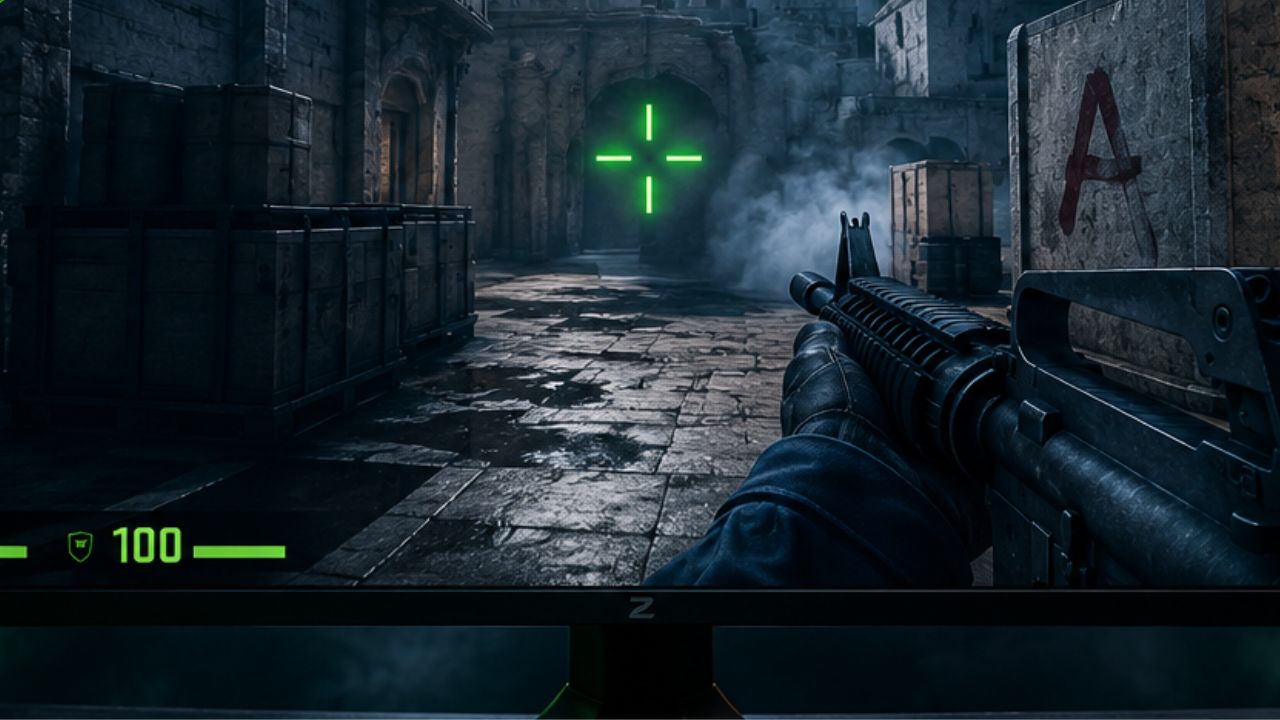
Whether you’re grinding Premier, climbing FACEIT, or competing in high-level matchmaking, your crosshair is one of the most important settings in Counter-Strike 2. A well-designed crosshair improves target visibility, builds consistent muscle memory, and helps you land more accurate shots during fast-paced duels. While there’s no single “perfect” crosshair for everyone, the best CS2 players all share one thing in common—they use clean, distraction-free settings that maximize precision. Most professionals favor small, static crosshairs with high visibility, making it easier to track heads without obstructing their view.
In this complete 2026 guide, we’ll break down the best CS2 crosshair settings, explain what each option actually does, and showcase the exact crosshair codes used by top professional players like s1mple, ZywOo, donk, m0NESY, and NiKo. You’ll also learn how to import crosshair codes, customize your own setup, and avoid common mistakes that can hurt your aim. Whether you’re a beginner looking for a reliable starting point or an experienced player searching for the perfect competitive setup, this guide will help you find the ideal crosshair for your playstyle.
What Makes a Good CS2 Crosshair
A good CS2 crosshair is one that stays visible against any background, does not block your view of the target, and gives you a clear center point for aiming. The three core qualities are visibility, precision, and consistency.
Visibility means the crosshair color and size must contrast with both bright and dark surfaces. Precision means the crosshair should be small enough to aim at specific body parts without covering them entirely. Consistency means the crosshair should not change shape or size based on your movement, so your brain always knows exactly where the center is.
Key qualities of a well-designed crosshair:
- Small enough to see the target clearly behind it
- High-contrast color that stands out on all map textures
- Static behavior so it does not expand during movement or shooting
- No dot in the center unless you specifically prefer the dot-only style
- Outline enabled at low opacity to help it pop against light backgrounds
A common mistake is choosing a crosshair that looks good in the menu but disappears against certain wall textures during a match. Always test your crosshair on multiple maps before committing to it.
Best CS2 Crosshair Settings for Competitive Play
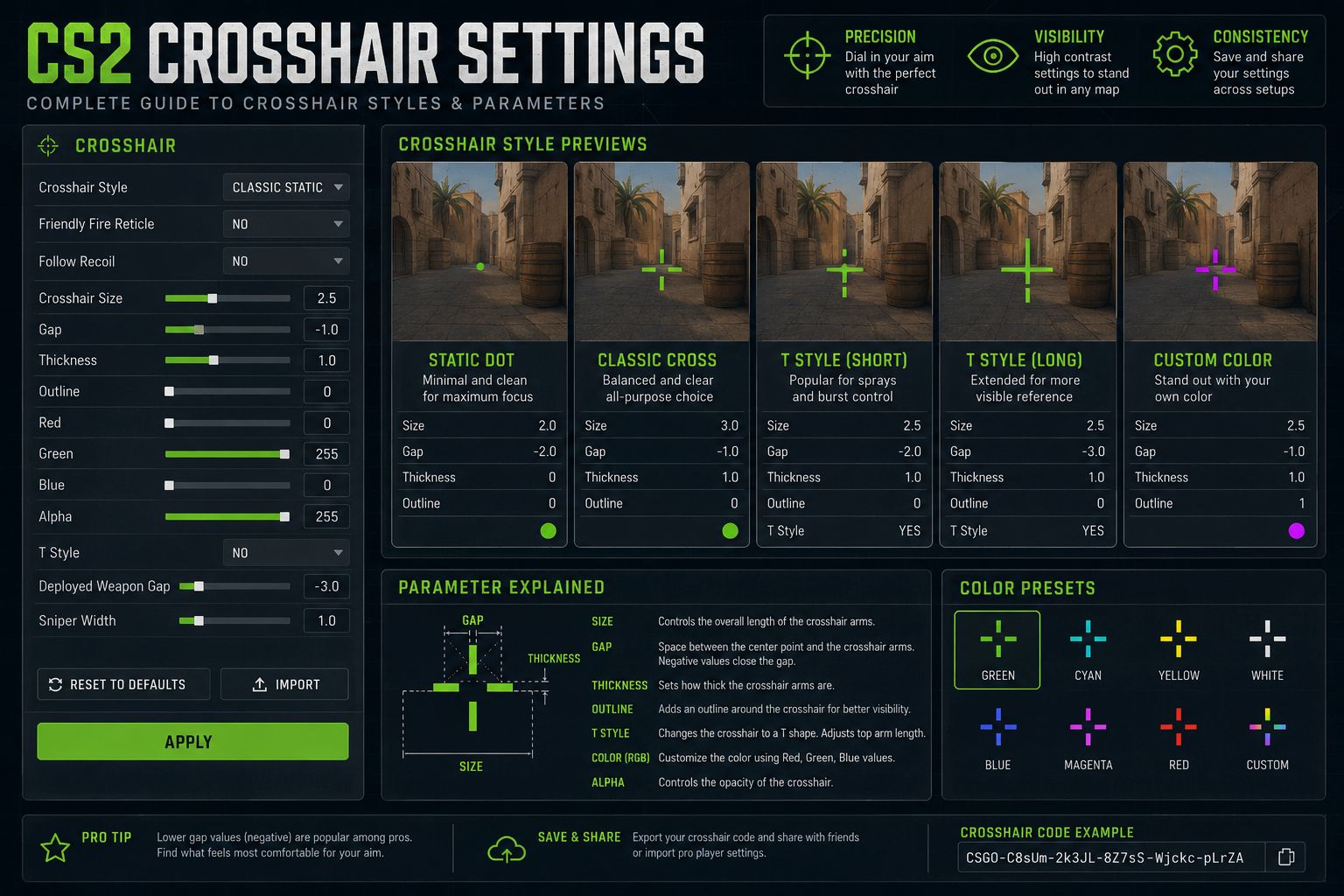
For competitive CS2 in 2026, the most effective crosshair setup prioritizes a static, small cross with a negative or zero gap. This eliminates the visual noise of a dynamic crosshair and trains better spray discipline.
Recommended competitive baseline settings:
| Setting | Recommended Value | Notes |
|---|---|---|
| Style | 4 (Classic Static) | No dynamic movement |
| Size | 1 to 2 | Smaller for rifles, slightly larger for AWP |
| Thickness | 0.5 to 1 | Thinner lines = more precision |
| Gap | -3 to 0 | Negative gap closes the center |
| Outline | 0.5 to 1 | Helps visibility on bright surfaces |
| Center Dot | Off (or on for AWP) | Personal preference |
| Color | Lime Green or Cyan | Best contrast across most maps |
| Dynamic | Off | Essential for competitive accuracy |
Choose a smaller crosshair (size 1, gap -3) if you play rifles like the AK-47 or M4A4 and focus on precise single-shot or burst fire.
Choose a slightly larger setup (size 2, gap 0) if you play aggressively and need to track fast-moving targets at close range.
CS2 Crosshair Size and Gap Explained
Crosshair size controls the length of each line segment, while gap controls the space between the center of the screen and where each line begins. Together, they determine how much of your target the crosshair covers.
- Size increases or decreases the length of the crosshair arms. A size of 1 is compact and precise; a size of 4 or higher starts to cover significant portions of the target.
- Gap is arguably the more important setting. A gap of -3 means the crosshair lines overlap slightly at the center, creating a near-dot effect. A gap of +5 creates a wide open cross with a large center hole.
- Negative gap values are preferred by most competitive players because they create a tighter aiming reference without fully committing to a dot crosshair.
A common beginner mistake is setting a large positive gap, which creates a false sense of precision. The wide center hole does not mean your shots land in that space; it just means you have less visual feedback about where the exact center is.
Static vs Dynamic Crosshair in CS2: Which Is Better
For competitive play, a static crosshair is better than a dynamic one in almost every scenario. A dynamic crosshair expands when you move, jump, or fire, which can be useful for learning spray patterns but ultimately trains bad habits.
Static crosshair advantages:
- Always shows the exact same shape, building consistent muscle memory
- Does not distract during spray sequences
- Preferred by the overwhelming majority of professional CS2 players
Dynamic crosshair use cases:
- New players learning that movement degrades accuracy
- Casual play where visual feedback is more useful than precision
The bottom line: if you are playing ranked or competitive modes, turn dynamic crosshair off. If you are a complete beginner who has never played a tactical shooter, leaving it on for your first few hours can help you understand the movement-accuracy relationship before switching to static.
Pro Player CS2 Crosshair Settings
Most top CS2 professionals in 2026 use small, static crosshairs with minimal gap and bright colors. While exact settings vary, the patterns are consistent across the pro scene.
Examples based on publicly documented pro configurations (approximate, as settings change between tournaments):
- s1mple style: Small static cross, size 1, gap -3, green, no dot, no dynamic
- NiKo style: Classic cross, size 2, gap -2, cyan, outline enabled
- ZywOo style: Very small cross or dot hybrid, size 1, gap -4, white or green
- device style: Slightly larger cross for AWP play, size 2-3, gap 0, green
These configurations share a common thread: all are static, all use high-contrast colors, and none use the center dot for rifle play. For a broader look at how pros configure their full game setup, see the Best CS2 Settings for Pro Players in 2026 guide.
Best Crosshair for CS2 AWP vs Rifle
The best crosshair for an AWP in CS2 is a dot or very small cross, because the AWP’s scope makes the crosshair irrelevant while scoped. For rifles, a small static cross with a negative gap is the standard choice.
AWP crosshair recommendations:
- Use a center dot only (style 1 or custom dot) for unscoped flick shots
- Size 0.5 to 1, center dot enabled
- The crosshair only matters when hip-firing or quick-scoping, so keep it minimal
Rifle crosshair recommendations:
- Classic static cross (style 4), size 1-2, gap -3 to 0
- No center dot for rifles, as the gap center serves the same purpose
- Thickness 0.5 to 1 for clean line definition
For SMGs and pistols: A slightly larger crosshair (size 2-3, gap 0 to +2) can help with the faster movement pace and close-range spray patterns typical of these weapons.
If you play multiple weapon types in the same session, pick a crosshair that works well for your primary weapon. Switching crosshairs mid-session disrupts muscle memory more than any slight suboptimal setting would cost you.
CS2 Crosshair Color: Best Visibility Options
Lime green and cyan are the best crosshair colors for CS2 in 2026 because they contrast strongly with the majority of map surfaces, which tend to be gray, brown, tan, and white. White and yellow can wash out on bright surfaces, and red blends with blood effects.
Color ranking by visibility:
- Lime Green – Best overall contrast, stands out on both dark and light surfaces
- Cyan – Excellent on warm-toned maps like Dust2 and Mirage
- White – Clean and readable but can disappear on snow or light concrete
- Yellow – Good on dark maps, poor on Overpass and Nuke
- Red/Orange – Avoid; blends with hit markers and blood effects
CS2 also allows custom RGB crosshair colors via console commands, so players can fine-tune beyond the preset options. For example, a slightly desaturated cyan can be easier on the eyes during long sessions without sacrificing visibility.
CS2 Crosshair Settings for Different Weapons and Spray Control
For spray control specifically, a static crosshair with a small negative gap helps because it gives you a fixed reference point to drag back to during recoil compensation. A dynamic crosshair that expands during spray actively works against this technique.
Spray control crosshair tips:
- Keep gap at -3 to -1 so the center is always clearly defined
- Avoid large crosshairs during spray; they obscure the target and make it harder to track the recoil pattern
- Some players add a center dot when practicing sprays so the exact center is always visible
Per-weapon guidance:
- AK-47 / M4A4 / M4A1-S: Size 1, gap -3, no dot, static
- AWP: Dot only, size 0.5, center dot on
- SMGs (MP9, MAC-10): Size 2, gap 0, slightly thicker
- Pistols: Size 1-2, gap -1 to 0, static
How to Import Crosshair Settings in CS2
Importing a crosshair in CS2 takes under 30 seconds using the built-in share code system. This lets you copy any pro player’s exact configuration without manually adjusting each slider.
Step-by-step import process:
- Open CS2 and go to Settings
- Click the Game tab, then select Crosshair
- At the top of the crosshair menu, find the Share or Import button
- Paste the crosshair share code into the input field
- Click Import and the settings apply instantly
To export your own crosshair:
- In the same menu, click Copy Sharecode to generate a code you can share with others
Share codes look like this format: CSGO-XXXXX-XXXXX-XXXXX-XXXXX-XXXXX. They are available on community sites, pro player streams, and CS2 forums. This system also works when pairing your crosshair with map-specific strategies; for more context on map play, check out the CS2 Map Guide: Best Strategies for Every Map 2026.
CS2 Crosshair Settings for Different Monitor Resolutions
The underlying crosshair setting values in CS2 do not change based on resolution, but the visual appearance does scale. A size-2 crosshair on a 1080p monitor looks proportionally different than on a 1440p or 4K display.
Resolution adjustment guidelines:
- 1080p (1920×1080): Standard settings apply; size 1-2 is ideal
- 1440p (2560×1440): Consider increasing size by 0.5 to 1 step to maintain the same visual footprint
- 4K (3840×2160): Size 2-3 may be needed to keep the crosshair visible without squinting
- Stretched resolutions (e.g., 1280×960): Crosshair may appear slightly wider; reduce size by 0.5 if it feels too large
Most competitive players use 1080p or 1440p, so the standard settings in this guide apply directly. If you play on a non-standard resolution, spend 10 minutes in a practice server adjusting size and gap until the crosshair feels proportional.
How Often Should You Change Your CS2 Crosshair
Changing your crosshair too often is one of the most common mistakes recreational players make. The answer for most players is: find a setup that works and do not change it for at least four to six weeks.
Muscle memory in CS2 is tied to visual reference. Every time you change your crosshair, your brain needs time to recalibrate where the center point is relative to your target. Frequent changes create inconsistency that shows up as missed shots and poor spray control.
When it is appropriate to change:
- You move to a significantly different resolution or monitor size
- You switch your primary weapon class (e.g., from rifles to AWP)
- Your current crosshair genuinely disappears on specific map surfaces
- You are starting fresh and experimenting during your first month of play
When to leave it alone:
- You are in the middle of a ranked climb
- Your aim feels inconsistent (this is almost never the crosshair’s fault)
- You just saw a pro use something different and want to copy it immediately
If you play other tactical shooters alongside CS2, it is worth noting that crosshair philosophy carries over. The Best Valorant Crosshair Settings for 2026 guide follows similar principles, and many players use near-identical setups across both games.
Common CS2 Crosshair Mistakes to Avoid
Several crosshair habits consistently hurt player performance, and most of them come from aesthetic preferences overriding functional ones.
Mistakes to avoid:
- Using dynamic crosshair in competitive play: It creates visual noise and trains you to ignore the crosshair during spray
- Setting gap too high: A large center hole does not improve aim; it just makes the crosshair look stylish while reducing precision
- Choosing color based on aesthetics alone: Red and orange look aggressive but perform poorly in actual matches
- Copying a pro’s crosshair without testing it: A setting that works at 400 DPI may feel wrong at 800 DPI
- Enabling T-style crosshair (style 2 or 3) without reason: Removing the top line can help some players focus on the horizontal plane, but most players lose precision without the full cross
- Making the crosshair too large: A size-5 crosshair covers the head of a target at medium range, giving you less information, not more
- Changing settings between every session: Consistency matters more than finding the “perfect” setup
For players who also enjoy other competitive shooters, the same principles apply broadly. See the Best Valorant Settings for Pros in 2026 for a parallel breakdown in Valve’s other major tactical title.
Final Thoughts
The best CS2 crosshair settings in 2026 come down to a few non-negotiable principles: use a static crosshair, keep the size and gap small, pick a high-contrast color, and stop changing it once you find something that works. The specific numbers matter less than the consistency you build around them.
Actionable next steps:
- Set your crosshair to style 4, size 1-2, gap -3 to 0, thickness 0.5-1, lime green or cyan, dynamic off
- Enable a low outline (0.5) to improve visibility on bright surfaces
- Use the share code import system to quickly test pro configurations before committing
- Test your setup across at least three different maps in a practice server before using it in ranked
- Lock in your settings and do not change them for at least four weeks; evaluate performance after that window
- If you play AWP, set up a separate dot crosshair and import it via share code when needed
Pairing great crosshair settings with the right overall game configuration makes a real difference. The Best CS2 Settings for Pro Players in 2026 guide covers video, audio, and mouse settings that complement the crosshair work done here. For players who also compete in other titles, the Best Fortnite Settings for Competitive Play in 2026 and Best Apex Legends Settings for PC and Console 2026 guides apply the same performance-first approach to those games.
Frequently Asked Questions (FAQs)
What is the best crosshair style number in CS2?
Style 4 (Classic Static) is the most widely used among competitive and professional players. It produces a clean, non-moving cross that does not respond to movement or shooting.
Should I use a center dot in CS2?
For rifle play, a center dot is generally unnecessary because a tight negative gap already provides a clear center reference. For AWP players, a dot-only crosshair is a popular and effective choice.
What crosshair gap should I use in CS2?
A gap of -3 to 0 works best for most players. Negative values close the center of the crosshair for tighter precision, while values around 0 leave a small but defined gap.
Does crosshair color affect performance?
Yes, in a practical sense. Lime green and cyan provide the best contrast across CS2’s map textures. Poor color choices can make the crosshair hard to see, which creates hesitation during aim.
Can I use different crosshairs for different weapons in CS2?
CS2 does not natively support per-weapon crosshair profiles, so most players choose one crosshair that works well for their primary weapon and accept the trade-off on others.
A share code is an alphanumeric string generated from your crosshair settings that another player can paste into their settings menu to instantly copy your exact configuration.
Is a dot crosshair good for CS2?
A dot crosshair works well for AWP players and for players who have very precise aim and want minimal visual obstruction. It is harder to use for spray control because there are no arms to guide recoil compensation.